Informa helps businesses and professionals in hundreds of ways.

Our international portfolio of live events, world-leading research publications, and innovative digital services provide specialists with the knowledge and connections they need to thrive.

Full Program available! πŸ‘‰ Download now >> | Early Bird rates end September 15 |

Full Program available! πŸ‘‰ Download now >> | Early Bird rates end September 15 |

Full Program available! πŸ‘‰ Download now >> | Early Bird rates end September 15 |

Full Program available! πŸ‘‰ Download now >> | Early Bird rates end September 15 |

Full Program available! πŸ‘‰ Download now >> | Early Bird rates end September 15 |

Full Program available! πŸ‘‰ Download now >> | Early Bird rates end September 15 |

Refund Request Process

Dear Customer,Β 

Find below the steps required to apply for a refund. Please note that our refund policy is in accordance with the applicable terms and conditions and Cancellation Policy.Β 

For Customers Residing Outside the GCCΒ 

For AMWC Dubai 2026, customers residing outside the GCC may cancel their registration for any reason and receive a 100% refund of the Event fees, provided the cancellation is received by:Β 9:30 AM (Dubai time) on 19 October 2026.

Cancellations must be submitted through your customer account or in writing to refund@euromedicom.com.Β 


For Customers Residing in GCC Countries

For customers residing in GCC countries, the standard cancellation and refund policy applies:Β 

  • Cancellations received up to 30 days before the first day of the relevant Event are eligible for a refund of 80% of the Event fees, with the remaining 20% retained as a processing fee.
  • Cancellations received less than 30 days and up to 15 days before the first day of the relevant Event are eligible for a refund of 50% of the Event fees, with the remaining 50% retained by way of a processing and cancellation fee.
  • Cancellations less than 15 days before the first day of the relevant Event cannot be accepted, and no refunds or credits will be provided.

All cancellations must be submitted through your customer account or in writing to refund@euromedicom.com.Β 

1. Please log in

to your Euromedicom customer account.

If you do not remember your account details, click on β€œforgot your password?”

Please check your spam folder just in case the confirmation email got delivered there instead of your inbox.

2. Click on "My orders"

3. Find the order you would like to cancel

and click on "Request a refund" option.

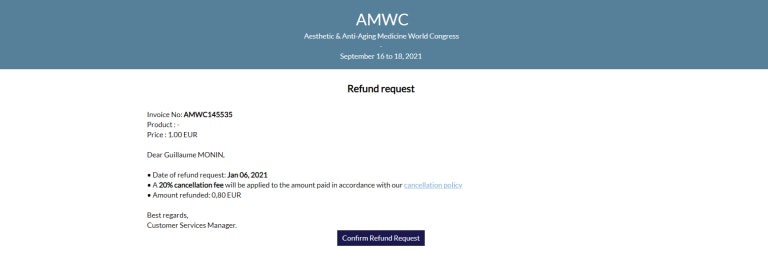
4. Once this option is selected

the refund conditions will be displayed.

5. Confirm your refund request

Please note that refunds are granted according to our Cancellation Policy.

6. Once completed

you will receive a confirmation email with details of your refund.

Please do not hesitate to get in contact if there are any issues with the process.

The Customer Services Team
Email: registration@euromedicom.com
Tel: +33 (0)1 58 56 74 00